The next generation of BIM editing
Edit and analyse IFC models with AI, simply. Precise and traceable.
What used to take specialist software and days, the AI now reads and builds right in the model.
.ifc format
Built on open standards.
Model and analyse
New elements, measured before they go into the file. Plus costs, bills of quantities and emissions per storey, element or space.
Knowledge included
The AI brings expertise: it raises thermal bridges, drainage and setbacks before anyone asks. Deciding stays with the planners.
Quantities for tender
Quantities per element, material and storey, with the source of every number.
Concrete volume per storey, split into walls, slabs and columns.
Check and clean up
Missing materials, elements without a storey, values that do not match the body.
Which elements still lack a material?
Explore variants
Several versions of a design side by side, each with its own numbers.
How does the GFA change if the top floor is set back?
Coordinate trades
Check the consultants’ models against each other, every conflict with location and parties involved.
Which pipes and ducts cross load-bearing walls without an opening?
Edit the shared .ifc
Change values, dimensions and elements directly in the .ifc that everyone involved shares.
Set the sill height of all windows on the 1st floor to 90 cm.
Hand over to operations
Fill rooms, equipment and maintenance values for facility management.
Add the inspection interval to every fire damper.
One language for everyone on the model.
Clients understand the model without learning software.
Roughly what will the facade cost?
The facade has 1,840 m², 520 m² of it windows. For a price I need a rate per m²: shall I use the one from the cost estimate?
Architects change the model with one sentence, not a hundred clicks.
Swap all timber windows for timber-aluminium, same sizes.
86 windows now carry the timber-aluminium type, their sizes unchanged. The new type has no U-value yet: shall I enter it from the manufacturer's data sheet?
Engineers find problems before they reach the site.
Where are columns not stacked above each other?
At 6 points a column shifts by more than 10 cm from the 1st floor to the ground floor, most at grid C/4 with 1.20 m. Each point with grid and storey.
BIM coordinators check and clean up the model before handover.
Check the model against the client's IDS.
412 of 2,380 elements fail the IDS, mostly for a missing fire rating. The list is sorted by rule and storey, 3 rules I could not read.
Contractors split pours by quantity, not by gut feeling.
Split the 1st floor into three pours of roughly equal quantity.
Three pours of 61, 64 and 59 m³, split at grids C and F. Does the joint at grid F work, or rather at G behind the stair core?
Projects and models in one place
Why now
Three things are coming together right now.
openBIM is standard
IFC is the standard, and public contracts require it.
AI operates tools
AI understands language and can operate tools.
Proof becomes mandatory
Whoever lets AI make changes must show what it did.
Roadmap
Nov 2026
Beta
- Try it in the browser: sample model without an account, your own models with one
- Change shape and properties by talking
- Connect your own AI via MCP
- Analyses across the whole model
Q1 2027
Launch
- Project store and versions
- Discipline models with clash and IDS checking
- Drawings from the model (floor plans, elevations, sections)
- Add-ons (costs, emissions, scheduling …)
H2 2027
Outlook
- Automatic product selection and procurement
- Check building regulations, prepare the permit application
- Building operation with a digital twin
Quickstart
Connect your AI to moddl in two steps.
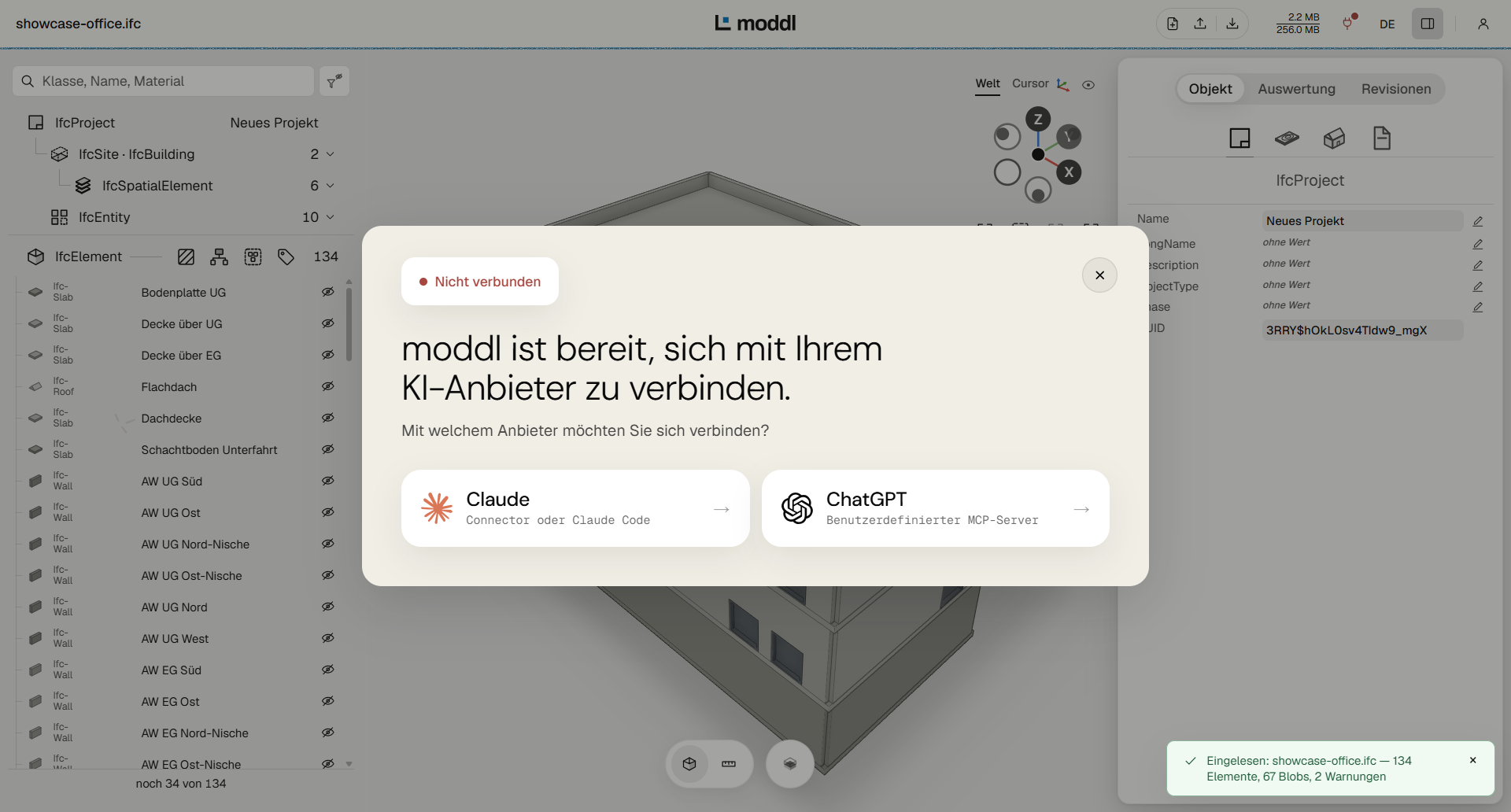
Step01
Open the viewer
The sample model without signing in, your own .ifc files with a free account.
Step02
Choose your provider
moddl walks you through the connection step by step.
Frequently asked questions
What are the requirements?
You need an AI assistant with MCP support, for example Claude or ChatGPT. ChatGPT can also be used on the free plan.
Which AI assistants are supported?
Claude, ChatGPT, Gemini and Microsoft 365 Copilot (organizations only), as well as any application that supports the open Model Context Protocol (MCP). The setup guide for your provider is available in the viewer.
Is a moddl account required?
Not for the sample model. To upload your own models, you need a free account.
What does it cost?
During the beta phase, expected to run until June 30, 2027, moddl is free of charge. We will announce the end of the beta at least two weeks in advance. Your AI assistant is subject to your provider's terms.
Which IFC versions are supported?
IFC4 and IFC4X3. Files in IFC2X3 format are converted automatically on upload.
Is there a size limit?
During the beta phase, the limits are 20 MB per IFC file and 40 MB of storage per account.
Does the AI get access to my IFC file?
No. The AI receives only the answers to its requests and reports on the changes it has made. These answers may contain content from the model, such as element names and properties.
Can changes be undone?
Yes. Every change is created as a revision of its own, and every earlier state can be restored. The uploaded original file remains unchanged.
Can I use the result in my BIM software?
Yes. You can export the model as an IFC file at any time. moddl writes only the parts that changed; all other values are preserved unchanged.
Where and for how long is my data stored?
Models are stored in Germany, and the application is operated in Nuremberg (Germany). If you work on the sample model without an account, nothing is stored permanently: your workbench stays on the server for up to 24 hours after last use and is then discarded. Further information is available in the privacy policy.
Team
We are an interdisciplinary team from software development and building design, currently in the founding phase. We are rethinking BIM design, for better planning and decisions that are economical and save resources.
We welcome feedback on the application and an exchange with everyone who wants to help shape the future of planning and building.